GP Integration

Paylite® is the preferred HRMS for the GCC region


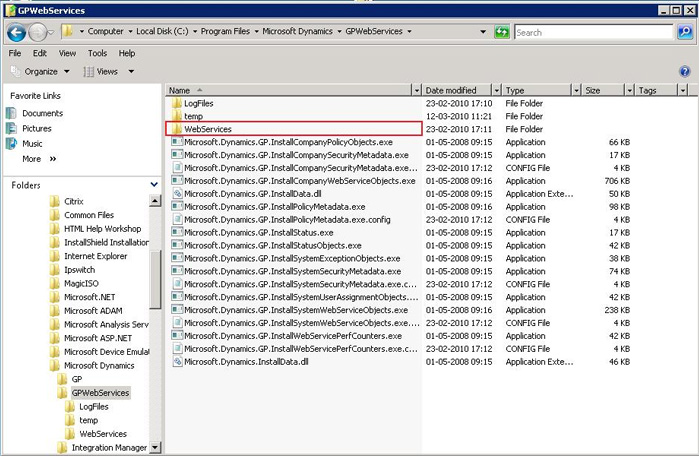
Step 1.0: Please copy the web service from GP server directory as shown below and publish it as online link (it can be copied to server which has Paylite installed.)
Note: After copy to wwwroot please make virtual directory for the web service folder. You can check whether web service is working or not as if you open the link in browserhttp://servername/webservice/GPWebservice.asmx
Step 2.0: Open the tool (we will provide the tool) as below and post to GP by pre-generated .xml file made from Paylite.
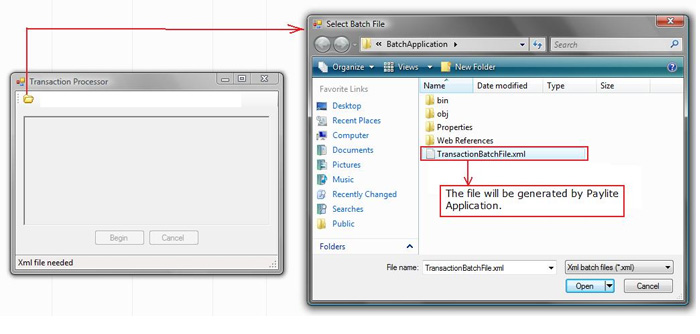
Step to generate “.xml “file by Paylite:-
Step 2.1: Publish Salary
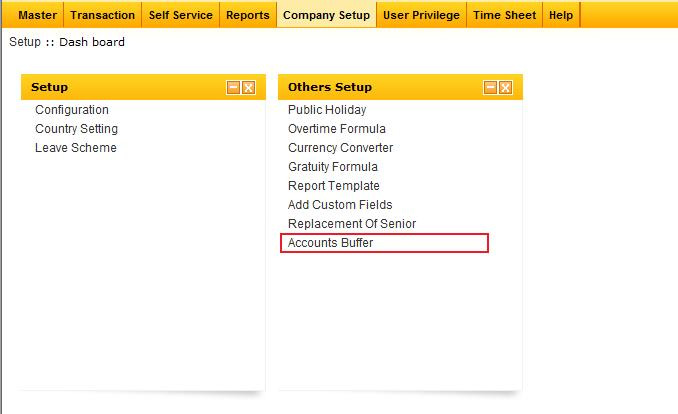
Step 2.2: Click on menu ‘Account Buffer’ as below.
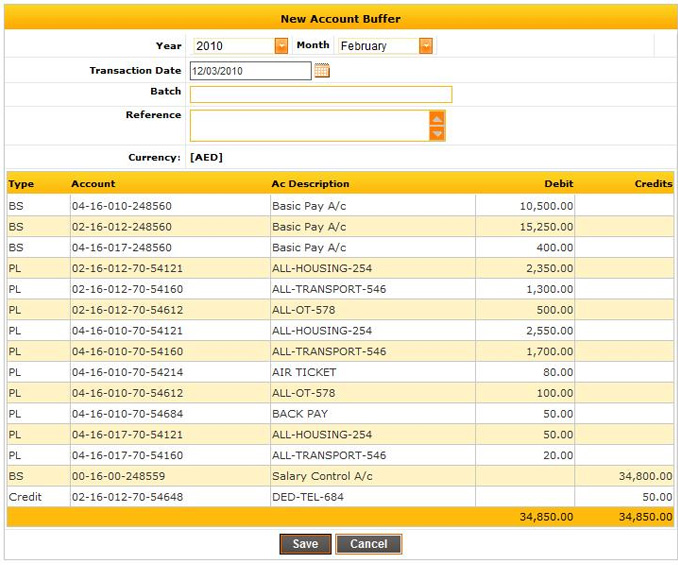
Step 2.3: Save a/c buffer
Step 2.4: Approve buffer
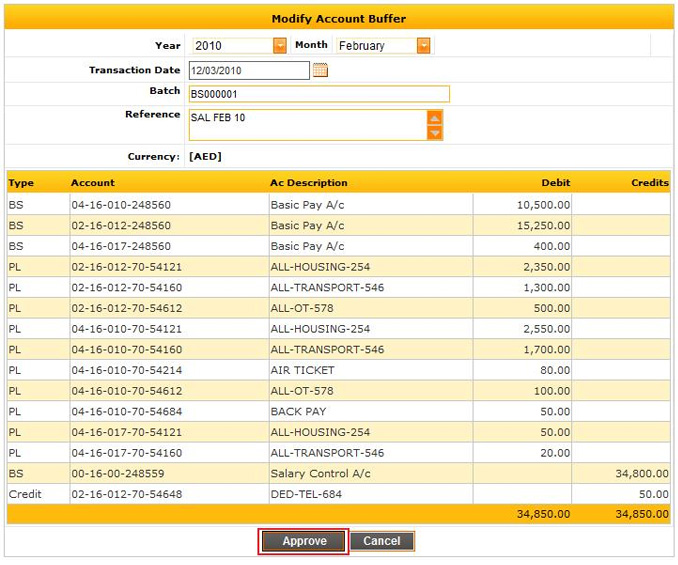
Step 2.5: GP Batch File can be downloaded from the link shown below.
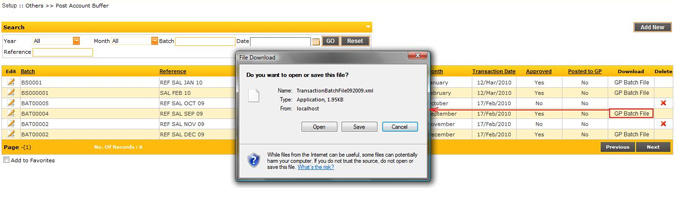
This XML file can be used to import in GP which is described in step 2.0.
Frequently Asked Questions
Paylite HRMS integrates with Microsoft Dynamics 365 to automate payroll accounting, employee financial data transfer, and ERP synchronization between HR and finance systems. This helps organizations improve payroll accuracy, reduce manual entries, and streamline HR and accounting operations.
Paylite HRMS integrates with Microsoft Dynamics 365 using configurable export formats, APIs, and financial data mapping. Payroll journals, salary data, accruals, allowances, deductions, and accounting entries can be transferred seamlessly into the GP ERP environment.
The Business Central integration supports transfer of:
Regular payroll journal
Leave provisions
Gratuity provisions
Air ticket provisions
Employee cost center records
Earning and deductions components breakup
Advance and Loan details
Reimbursement details
End-of-service benefits
Provisions reversal records
This ensures accurate payroll accounting and financial reporting.
Yes. Paylite HRMS supports payroll posting to Microsoft Dynamics 365 after payroll processing is completed. Payroll data can be exported in Microsoft Dynamics 365 -compatible formats to simplify finance and accounting operations.
Yes. Paylite supports automated payroll exports and scheduled synchronization with Microsoft Dynamics 365, reducing manual intervention and improving operational efficiency.
Yes. Paylite HRMS offers flexible Microsoft Dynamics 365 integration configuration based on your company’s chart of accounts, payroll structure, cost centers, departments, and accounting workflows. Organizations can customize account mappings and payroll posting formats according to business needs.
Integrating Paylite HRMS with Microsoft Dynamics 365 helps organizations automate payroll, HR, and finance operations by enabling seamless data synchronization between HRMS and ERP platforms.
Benefits include:
Reduced manual payroll journal entry
Faster payroll accounting
Improved payroll accuracy
Automated ERP posting
Better audit and compliance tracking
Reduced payroll processing time
Centralized HR and finance information
Improved payroll reporting and analytics
Yes. Depending on the organization’s business requirements and technical architecture, Paylite HRMS can support multiple integration approaches with Microsoft Dynamics 365 and Microsoft Dynamics 365 Business Central.
Supported Integration Options:
Real-Time API Integration
Supports near real-time synchronization using:
REST APIs
Web Services
Database Level
Manual Export & Import
Supports manual generation and transfer of:
CSV files
Excel files
XML files
Yes. Paylite HRMS uses secure data transfer methods, role-based access control, and enterprise-grade security practices to protect payroll and employee information during integration with Microsoft Dynamics 365 systems.
Yes. Paylite HRMS is designed for GCC and Middle East businesses and supports integration with Microsoft Dynamics 365 for payroll, HR, finance, and ERP operations.
The solution supports regional payroll requirements, labour law compliance, WPS processing, and localized payroll workflows for organizations operating in:
United Arab Emirates
Saudi Arabia
Qatar
Bahrain
Kuwait
Oman
Egypt
Jordan
Lebanon
Implementation timelines depend on several factors, including:
Payroll complexity
ERP configuration
Customization requirements
Number of legal entities or branches
Country-specific compliance requirements
Integration scope
Existing HRMS and finance processes
Paylite implementation consultants assist organizations throughout the integration, testing, deployment, and post-go-live support process.
Yes. Paylite provides technical and functional support for Microsoft Dynamics 365 integration projects, including implementation assistance, integration configuration, payroll mapping, testing support, and technical consultation.
Support Services Provided
Implementation Assistance
Paylite consultants assist organizations with:
Requirement analysis
Integration planning
ERP connectivity setup
Payroll process alignment
Integration Configuration Support
Support includes:
API configuration
File interface setup
Data entity mapping
Middleware integration assistance
Security and access configuration
Payroll Mapping Guidance
Paylite supports mapping between:
Payroll components
Cost centers
GL accounts
Employee master data
Financial dimensions
Allowances and deductions
Testing & Validation Support
Technical teams assist during:
Unit testing
UAT
Payroll reconciliation
Journal validation
Error handling verification
Yes. Payroll exports to Microsoft Dynamics 365 can be automated based on payroll cycles, approval workflows, or scheduled processing requirements to improve payroll efficiency.
Paylite HRMS combines payroll, attendance, employee self-service, leave management, compliance, and ERP integration capabilities within a single platform. Its strong GCC payroll localization and flexible integration framework make it a suitable HRMS solution for organizations using Microsoft Dynamics 365 and Microsoft Dynamics 365 Business Central.
Key Reasons to Choose Paylite HRMS
Paylite offers integrated modules for:
Payroll processing
Attendance management
Leave management
Employee self-service (ESS)
Loan & advance management
Overtime and shift management
HR administration
Document and workflow management